Review a project with your team
Bring collaborators into a project, review the evidence together and record the decision.
- Status
- Limited preview
- Access
- Project members · A manager can invite collaborators
- Reading time
- 2 min read
- Updated
- Updated Oct 25, 2026
Keep the files, questions and review decisions together so everyone can follow how the investigation reached its conclusion.
Bring in the right people
Invite a collaborator
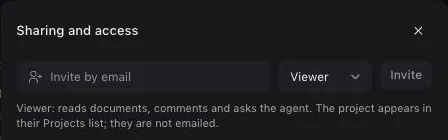
Open the project and choose Share. Enter their email, choose a role and select Invite. Use Viewer for someone reading and asking questions, Editor for someone contributing evidence and reviews, or Manager for someone managing the project.
Send the project link
The project appears in the invited person’s Projects list. Send them its link through your usual channel; adding a project member does not send an invitation email. They should sign in with the email you added.
Review a finding together
Read the evidence first
Open Inbox and select a finding. Follow its citations to the original files, check the relevant version and add your review note. Use Ask AI to investigate a question about the evidence.
Resolve the open question
Choose Request information when evidence is missing. When you can decide, confirm or dismiss the finding and record why. Mark a confirmed finding resolved once it has been dealt with. Reopen it if new evidence changes the question.
Did this guide get you unstuck?
One click is enough. No message or account required.