Views, Saved & sharing
Begin from a reviewed live View, organize saved items into collections, import an existing list, and share an agent answer, a reproducible map scene, or an embed.
Open Saved- Status
- Live
- Access
- Free account for Saved, sharing answers, embeds, and downloads
- Reading time
- 13 minutes
- Reviewed
- Sep 27, 2026
- Maintained by
- Product
Views are reviewed, source-labeled starting points for recurring grid questions. Each one combines a focused live table, an explanation of what the configuration means, its supporting sources, and an Open in Map handoff that preserves the actual interactive state.
Saved turns that state into a personal library across devices. Assets, views, and stories can belong to several collections without duplication, existing EIA plant-ID lists can be resolved before import, and an agent answer or a complete map scene can leave the product as a stable link, branded image, or live or time-fixed embed.
On this page
Begin from a reviewed View
Use Views when the recurring question already has a useful market, layer, filter, and explanation.
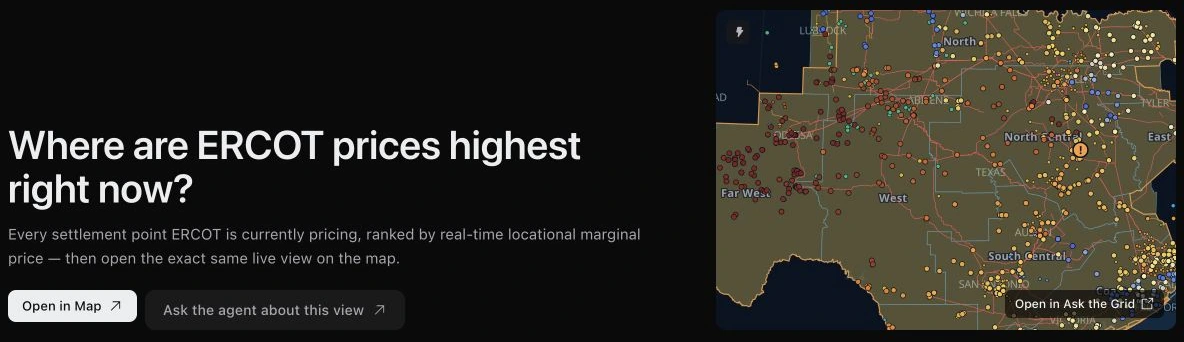
Choose the operating question
Browse Views grouped by subject—prices, interconnection queues, power outages, grid events, and the transmission network—then open one to read its current table, explanation, source notes, and update basis. Use its map action, such as Open in Map, when the next step requires changing layers, time, camera, selection, or agent context, or Ask the agent about this view to start a question from it.
Return to a stable route
A View keeps a permanent address for the question while its live values continue to update. Use Copy view link to send that public page to a teammate when they should see the reviewed configuration. Save it when it belongs in your personal workflow.
Save what matters
Create your library
Create a free account to save assets to your library, save map views, and keep useful stories together across devices. Use Save on a map info card to file an asset into Saved or a collection, and name the current scene in the map's Views tool to save it as a view.
Shared map links remain public; Saved is the private library attached to your account.
Use the Saved library
Open Saved → All saved to browse your library. Filter by assets, views, or stories, or search by name. Add items searches grid assets directly; From saved lets you choose existing items. Select an item to return to its map scene or story. When signed in, ask the grid agent about your saved assets or name a collection from any agent entry point. The agent can retrieve your current library, including assets saved since the conversation started. A saved plant identifies the asset; price and basis research still requires a verified settlement-node relationship.
Create a collection
Open Saved → Collections and choose New collection. Enter a name and optional description, then add items for an operating fleet, client project, contracted supply, or market watchlist. The same asset can belong to several collections. If you have no collections, Try this collection creates an editable ERCOT example with three real assets, labeled example notes, and a review-status field.
- 1Open Saved → Collections and choose New collection.
- 2Name the collection and add a description if useful.
- 3Use Add items to find grid assets, or From saved to reuse items already in your library.
Compare items and keep collection-specific context
Switch between Table and Cards inside a collection. Table puts custom fields in comparison columns; Cards groups the same values per item. Define text, number, date, or select fields in Edit collection. Use Add note or the edit-context action to open the editing panel, choose the collection, and save notes and custom values together. The same item can carry different context in another collection.
Open a collection on the map
View on map opens the Collections rail tool with that collection open and drawn on the map in its own color. The tool lists every member with its notes and custom fields; items in other markets and saved references appear separately. Select a member to open its ordinary asset card. Missing locations and loading failures are shown explicitly. The open collection and its context are available to the grid agent. Back to collections returns to the list.
See what is reaching a collection now
A collection with assets opens on Now: a row of cards for every Grid Radar finding and operator posting that reaches at least one of its assets, and a Now column beside each asset. Each card says how it reaches them. Direct means a posting or price names the asset's own settlement point, plant, substation or line. Priced means a binding constraint's shadow price times the asset's shift factor moves its own node, shown in $/MWh against the market reference, in markets with published shift-factor estimates. Located means the asset's hub, load zone, county, or a posting within 10 miles. Technology means a finding about its fuel, such as a solar forecast miss or scarcity for storage and gas. Findings that reach the whole market appear once, at the end of the row.
- 1Open a collection on Saved; Now sits under the collection's actions.
- 2Select a finding card for its evidence. Your assets, at the top of the dialog, lists each asset it reaches, the tie, and any priced effect.
- 3Own prices collects your assets' own settlement point prices when they move outside their last 14 days, measured against each point's own history and its hub.
An asset with no settlement point or zone to tie to says so in its Now column instead of looking quiet. Asset pages show the same cards for that asset when you are signed in.
Monitor, report, or export the collection
A collection with assets offers Alert on assets and Report on assets. These carry the asset set into the corresponding setup workflow, where you choose the monitoring or reporting details. Alert on findings, beside Now, creates a rule that is told whenever a finding or own-price change reaches one of the collection's assets through a specific tie. Export CSV downloads the collection's items with their context.
Manage the library without losing an item
The collection directory's Grid and Table views preserve your search and show each collection's name, description, and item count. Use a collection's three-dot menu to edit or delete it. Deleting a collection keeps its items in All saved. Removing an item from one collection also keeps it in All saved; the item menu distinguishes that action from removing it from Saved.
Put your collections on the map
Every asset you saved is marked on the map, and each collection can be shown or hidden like a layer.
Saved assets on the map
Every asset you saved carries a small badge beside its own marker: a disc in its collection’s color with a bookmark on it, the same way a current event carries a ! badge. The badge grows and shrinks with the map, like the price nodes do. Saved assets is a layer in Map content, on by default; untick it to take every badge off at once, and use the arrow at the end of its row to open the Saved tool. A saved congestion path is drawn as a dashed line between its two ends.
Show or hide a collection
Open Tools on the map and choose Saved, which lists your collections. Every collection starts visible. Hover a collection and an eye appears beside its arrow; choose it to hide that collection’s assets from the map, and again to bring them back. A hidden collection keeps a crossed-out eye and a dimmed name, so you can see what is off without hovering. Show all and Hide all are in the tool’s header, beside the Fit button, which frames everything drawn. Opening a collection to read its members also puts it on the map.
- 1Open the map for any market, then choose Tools and Saved.
- 2Hover a collection and choose its eye to hide or show it.
- 3Choose the Fit button in the tool’s header to frame everything drawn.
- 4Choose View all saved assets at the bottom of the tool to open Saved.
Which collections are hidden is part of the page address, so a reload, the Back button and a copied link all restore it. A copied link shows a collection only to the person who owns it.
Members in other markets
A market’s map draws the saved assets that belong to that market. Below the list, a line says how many are on this map and how many of your saved items are in other markets, with a button for each market. Choosing one opens that market’s map with the same collections showing. Items that have no location, such as saved views, stories and answers, are not drawn, and any saved asset a market cannot find is counted rather than left out silently.
Show only your assets, and what is near them
Turn on Only my collections, under the list in the Saved tool, and the rest of the map fades back so what you saved is what stands out. Then choose a distance under Infrastructure within (5, 10, 25 or 50 miles) and every transmission line, substation and plant within that distance of the assets you are showing is drawn back in at full strength. A line that comes within the distance is drawn whole, so you can see where it goes. Lines are colored by voltage and plants by fuel, as they are on the rest of the map, and the line under the distances counts what was found. Hiding a collection removes what is near its assets too.
- 1Hide any collections you do not want to look at.
- 2Turn on Only my collections.
- 3Choose 5, 10, 25 or 50 miles under Infrastructure within. Choose Off to stop.
- 4Turn Only my collections off to bring the full map back.
Both settings are part of the page address, so a reload and a copied link restore them, and they stay on when you open another market from the line under the list.
Start from Saved
On Saved, Show all on map opens the market where most of your saved items are, with every collection showing and the Saved tool open. To start from one collection, open it and choose View on map.
Import an existing asset list
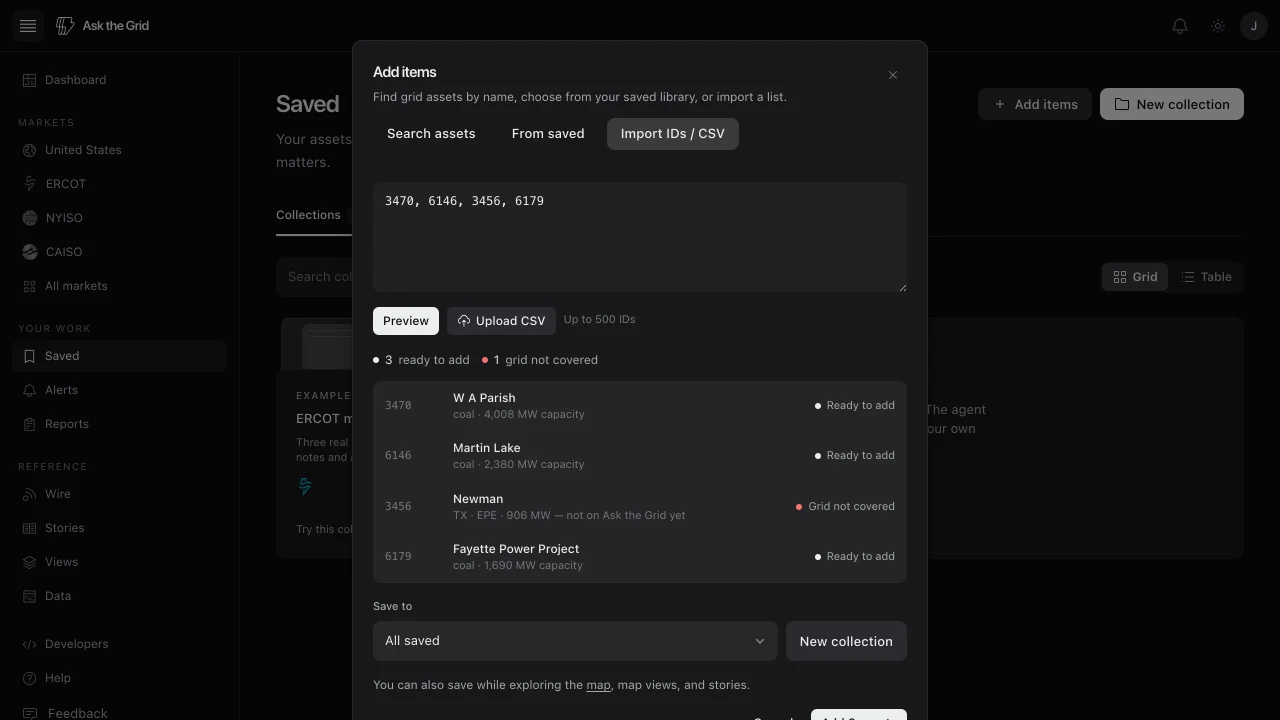
Resolve before saving
Paste EIA plant IDs or upload a CSV, then review the resolved name, fuel, capacity, market coverage, and existing Saved status. Unsupported or unresolved rows remain visible instead of being silently omitted.
- 1Open Saved, choose Add items, then Import IDs / CSV.
- 2Paste EIA plant IDs or upload the supported CSV.
- 3Preview and resolve the list.
- 4Choose an existing or new collection, then add the supported assets. When you start inside a collection, it is already selected.
Share a scene
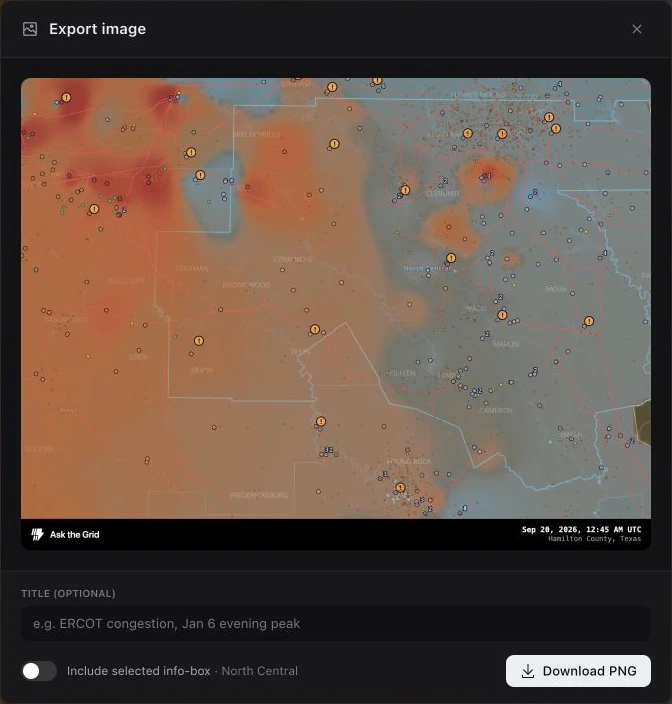
Embed a live grid view
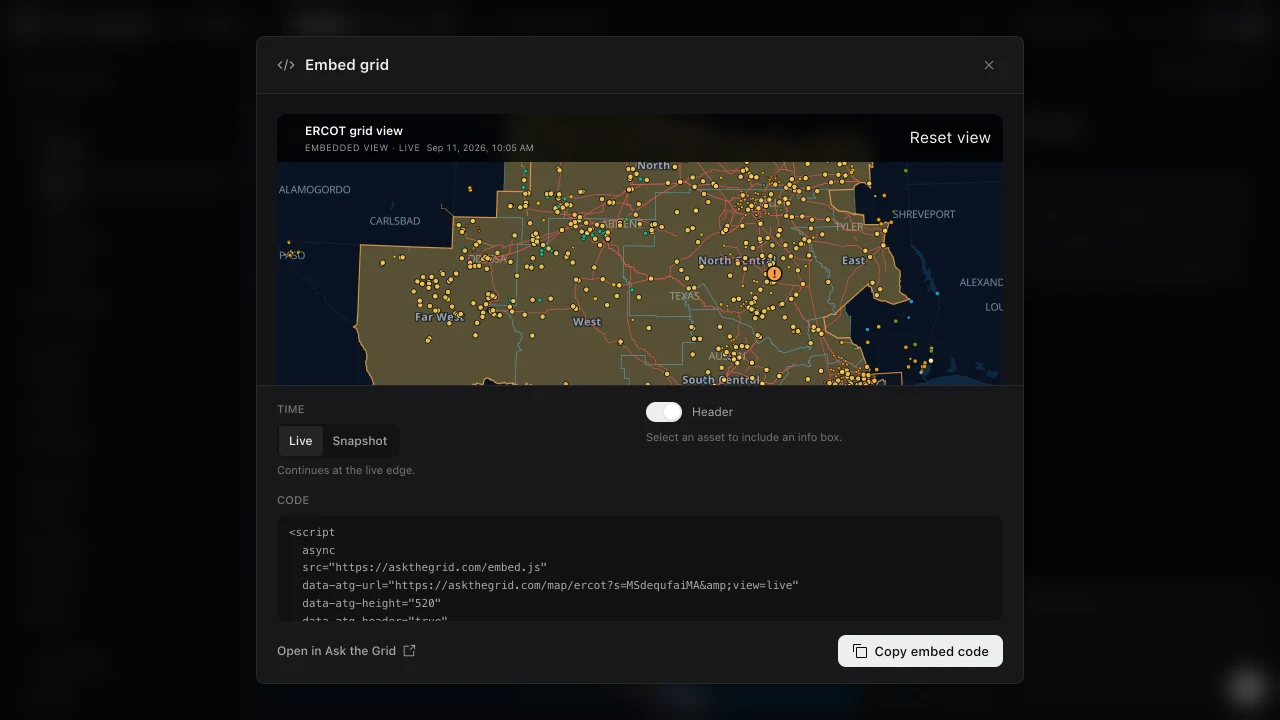
Build an embed
The embed builder turns the shareable part of a signed-in account's map scene into a permanent public view for another page. Choose Live or Snapshot, decide whether to show the header and selected asset's info box, preview the result, and copy the generated code. Readers can pan, zoom, and inspect assets inside the frame; Open in Ask the Grid carries the exact scene into the full workspace.
- 1Frame the grid, layers, camera, and selection you want to share.
- 2Open Share on the map and choose Embed grid….
- 3Choose Live or Snapshot and set the Header and Info box options.
- 4Choose Copy embed code and paste it into the destination page.
A Live embed keeps following the grid; a Snapshot embed preserves the selected moment.
Did this guide get you unstuck?
One click is enough. No message or account required.