Grid Radar
Read a market-native operating cockpit, distinguish live source states, arrange the desks you use, and hand any widget into an alert or investigation.
Open Grid Radar- Status
- Live
- Access
- Free account
- Reading time
- 13 minutes
- Updated
- Oct 13, 2026
Radar is the dense operating surface for ERCOT, NYISO, CAISO, PJM, MISO, ISO-NE, SPP, BPA, TVA, Baja California, AESO, IESO, CENACE, Hydro-Québec. Each market uses the same navigation and interaction model but only renders widgets supported by compatible public feeds. System condition, load, headroom, prices, constraints, generation, weather, forecasts, storage, and operator events remain market-specific rather than being copied from one operator into every desk.
A free workspace opens the system overview, complete desk set, and personal layout controls. Headline readings keep independent source clocks, so a fresh price cannot make an older load or generation publication look current. A widget can become a direct link, PNG export, agent attachment, or—where the market supports one—an alert draft, allowing an operating signal to move into a persistent workflow without being re-entered.
On this page
Read publisher reports
Choose a report and its period
Use publisher-report widgets on the operating desks for reserves, constraints, margins, load, renewables, curtailment, generation outages, interchange and capacity prices. Choose a report, then a source series and publisher scope. Monthly and annual selections resolve to their publisher period.
Keep source meaning intact
Observed generation, real-time schedules, day-ahead awards, forecasts, preliminary reports and final archives remain distinct. Outage capacity describes generation unavailable to the market. A source without a qualified clock retains its native time labels.
Follow the evidence
Expand Publisher rows to inspect the original worksheet or archive member. Schema, history & API opens the scoped catalog dataset. Eligible series offer Create threshold alert; all report families remain available to the agent through the catalog.
Compare Western market participants
Read participant settlement prices
Open the WEIM / EDAM tab on CAISO or BPA Radar. The Western markets desk compares CAISO hubs with PacifiCorp, Portland General Electric and BPA settlement aggregates. Real-time prices use a shared dispatch timestamp; day-ahead prices refer to the same delivery hour. Energy, congestion, losses and GHG retain their source components. A missing price is shown as a dash.
Keep forecasts and capacity products distinct
The adjoining tables show the next available delivery hour for day-ahead imbalance reserve and reliability capacity prices, and EDAM wind and solar forecasts by balancing area. Forecasts display publication time separately from delivery time and stay outside CAISO generation totals. The requirements and awards table separately shows MW by balancing area, market run and product. Prices and awards do not establish resource-sufficiency pass/fail results.
Read CAISO demand and adequacy snapshots
CAISO Radar shows observed system demand alongside the day-ahead and hour-ahead forecasts and demand response. Read observation time and capture time separately. The adequacy Outlook retains demand, capacity, reserves and credits with the operator’s original Time label; its interval convention must be reconciled before joining it to another feed. A dash means unavailable, while zero remains zero.
Compare outage forecasts and real-time ancillary prices
Western generation outages are forecasts by trading hub and fuel category from one report-day vintage. Aggregate categories overlap their components and must not be added together. CAISO’s ancillary table shows the latest common 15-minute real-time delivery interval, separate from hourly day-ahead prices and procurement MW. Both views retain their delivery and source clocks.
Choose the market desk
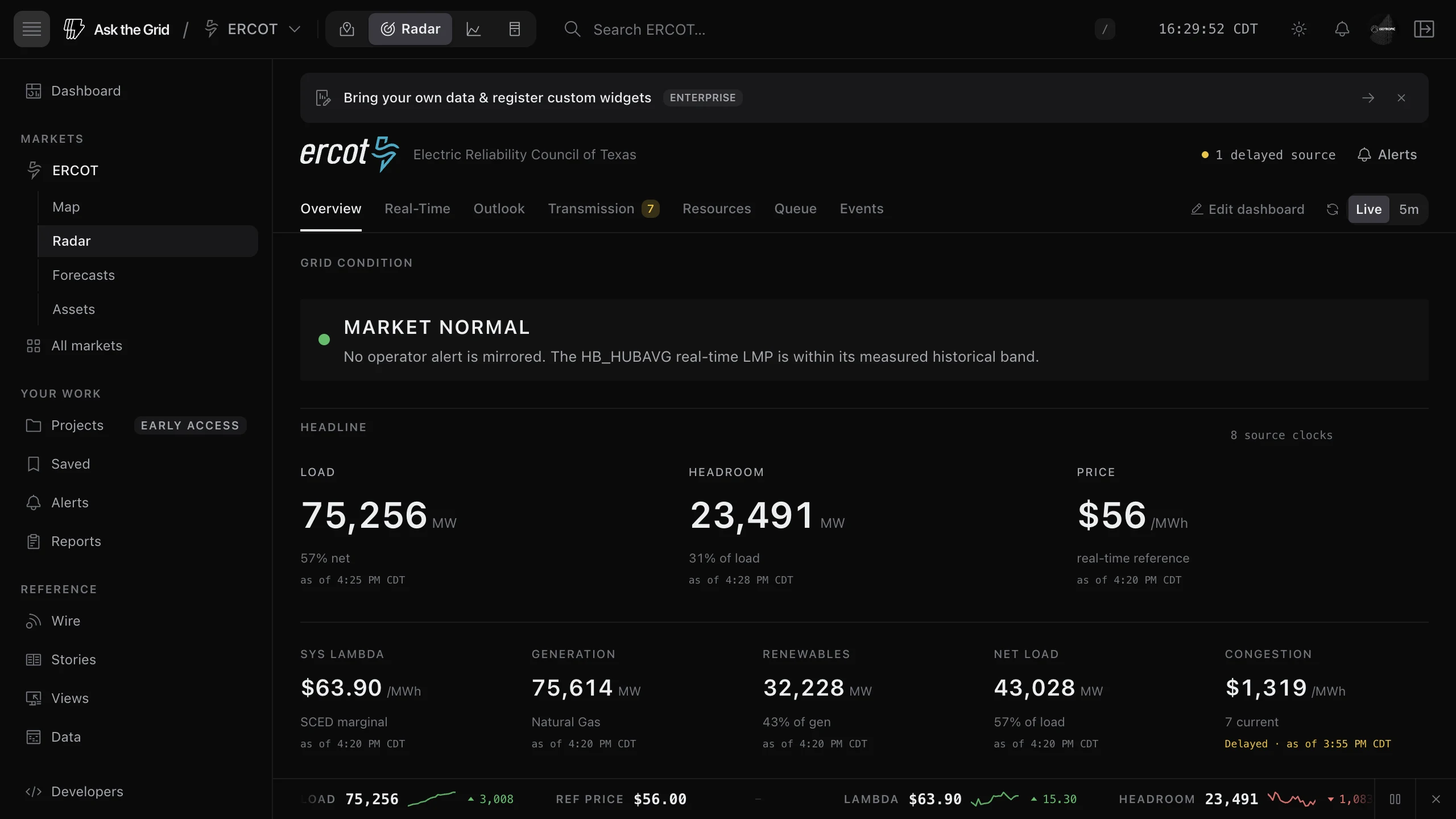
Open Radar from a market page or Today, then confirm the operator and source time before reading the values.
Read Baja California's day-ahead prices
On Baja California Radar, the headline price and Zonal prices table show CENACE day-ahead prices for the delivery hour, not a real-time US-market price. Ask the Grid converts pesos per MWh to USD per MWh using FRED's DEXMXUS exchange rate for that date or the latest earlier business day.
Check the price's delivery hour separately from demand and interchange observation times. Each widget keeps its own source clock.
Use the overview for orientation
Start with grid condition and the headline values, then open the widget behind a reading. Overview brings together the market's supported demand, supply, price, and forecast signals. Use Events for operator events, your alerts and briefs, and Energy Wire.
Move between supported desks
Choose Real-Time for observed readings, Outlook for forecasts, Transmission for constraints, Resources for generation and capability, Queue for proposed projects, or Events for alerts and news. Available desks depend on the market. CAISO and BPA add WEIM / EDAM for Western participant prices, forecasts, reserve products, and outages.
ERCOT's RUC and ancillary-service capability sit in Resources; renewable and weather forecasts sit in Outlook. If you enable the modeled line-ratings experiment, Transmission shows temperature-adjusted rating changes against a reference temperature. These estimates are screening evidence, not operator facility ratings or available headroom.
Choose the refresh pace
Choose Live to update each feed at its own cadence, or 5m to refresh the assembled dashboard every five minutes. The header summarizes the independent clocks, while each headline value shows its own market-local source time and marks delayed or stale publications. The refresh setting cannot make an upstream publication newer than it is.
Read market-native coverage
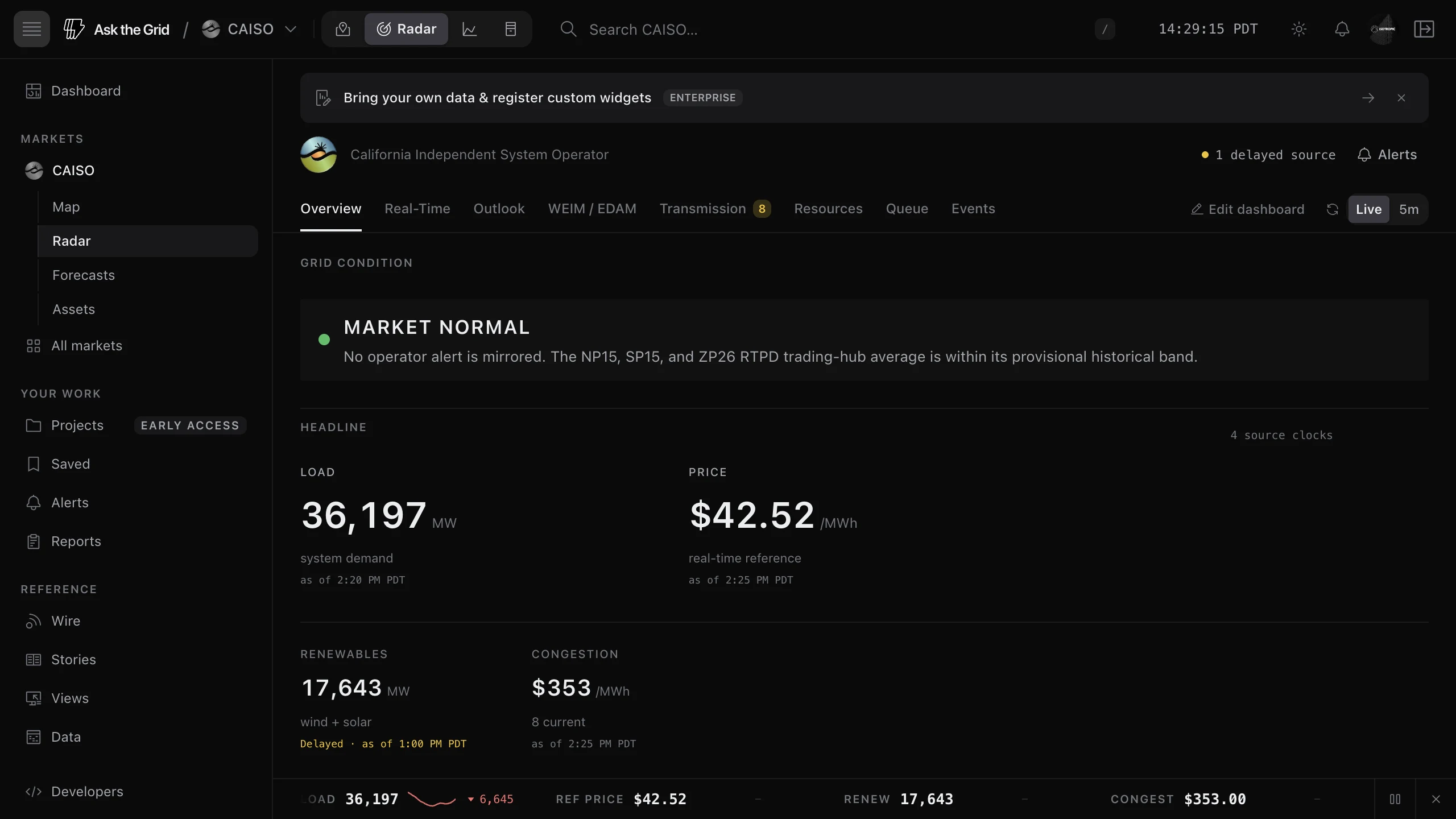
Equivalent desks preserve differences in operator terminology, market design, and publication cadence.
Do not compare labels alone
A reference price, reserve measure, constraint, outage, and forecast can use different definitions across markets. Open the widget source and read the market location, interval, unit, and status before placing values side by side.
Read TVA's balancing area
TVA Radar combines EIA-930 hourly demand, day-ahead demand forecasts and generation by fuel with TVA reservoir operations, NRC daily reactor status, OASIS transmission outage postings and the current generator interconnection queue. Select a reservoir to inspect its observed elevation and hourly discharge, daily forecasts, release intervals and notices. Each observation keeps its timestamp; forecast days and release time labels retain TVA's published meaning. NRC percentages describe rated reactor power. Queue MW are seasonal requests, and the source PDF carries a publication date. Transmission postings retain their source start and stop labels because the CSV does not state a timezone. TVA is a balancing authority and federal power provider, with no organized nodal energy market.
Read BPA's hydro and instrument desks
BPA combines five-minute balancing-area and reserve readings with Columbia/Snake hydro-project observations and NWRFC’s seasonal water-supply forecast at The Dalles. Ask the agent for a dam’s hourly spill or turbine flow from the Corps series, keeping its timestamp and units separate from the seasonal runoff outlook. Snowpack and runoff volume alone do not establish next-month hydro generation.
Interpret BPA’s snowpack index
The index compares summed snow-water equivalent at reporting SNOTEL sites with the same sites’ medians. Sites are selected by watershed code in the U.S. Columbia basin: Snake and Willamette are included; coastal, Puget Sound, and closed Oregon basins are excluded. It excludes Canadian snowpack and is not an area-weighted basin water volume. A missing or zero median leaves the percentage unavailable.
Read BPA instruments and interties
Grandview and Horse Heaven are 115 kV buses; their instrument readings measure voltage, not MW. Planned outages show their start date and market-local time. Interties keep their own source date and time: the daily archive is distinct from BPA’s near-real-time path charts.
Read CAISO demand and renewable forecasts by interval
CAISO's demand, wind, and solar actuals on Radar are hourly integrated readings. Its VSTLF demand and RTD renewable nowcasts target five-minute intervals, so a nearby timestamp does not give a valid forecast error. Radar keeps their levels visible, plots only future five-minute targets beside the hourly history, and leaves a forecast miss out of the Today briefing until matching intervals and measurement bases are available.
Separate system condition from local congestion
An operator-published condition leads wherever Radar mirrors one: each market's own emergency procedures, from an advisory through alerts and warnings to an emergency or load shed, with the operator's own label, the regions it covers and the NERC level where the operator states one. For other markets, the banner describes the market's reference price against that ISO's own measured or provisional historical band; it is not an operator reliability declaration. A binding constraint or wide local spread stays on the congestion and insight desks and does not escalate the whole grid condition by itself.
Read constraint identity at its evidence level
Where SPP publishes a monitored facility, Radar uses it as the constraint caption and shows the published contingency and East or West interconnect beside the shadow price, while the raw operator ID stays available on the row. Those labels are not a match to a map line or substation. When the public evidence does not establish a normalized identity, Radar keeps the raw ID unresolved instead of guessing from text or geography.
Read each market's own reference series
Price attention levels use the same reference series shown in the headline—such as ERCOT Hub Average, PJM-RTO, MISO Illinois Hub, ISO-NE Internal Hub, SPP North Hub, NYISO's 11-zone average, or the average of CAISO's NP15, SP15, and ZP26 trading hubs. A short historical mirror is identified as provisional rather than borrowing another ISO's threshold.
Separate ERCOT's RTC+B price components
ERCOT's System lambda & reliability adder widget keeps SCED system lambda and RTRDPA distinct. RTRDPA is the RTC+B reliability price adder applied to the matching real-time energy LMP. Keep it separate from settlement-point congestion and losses; use timestamp-aligned LMP, constraint, and demand evidence when explaining a price move.
Do not sum overlapping AS capability
The ERCOT ancillary-services widget compares requirements and day-ahead clearing prices with current RTC+B capability telemetry. Combined capability categories can overlap the standalone product rows, so Radar preserves the operator's categories and reveals combinations separately instead of adding them into a false system total.
Read frequency and ACE where each operator publishes them
ERCOT publishes system frequency and inertia, shown in the System frequency and System inertia widgets. Ask the agent for the latest inertia in GW·s or its trend over a time window; it can query the same minute snapshots. Historical coverage starts when collection began. MISO and PJM answer the same balancing question with area control error (ACE) in System operations, with interchange signs preserved exactly as published. Markets that publish neither omit these widgets.
Treat unsupported separately from quiet
A market can omit a widget because no compatible public feed exists. A supported widget can be quiet because no event or constraint is active, stale because the source has not advanced, or unavailable because retrieval failed. Radar keeps those states separate.
Build your desk
Arrange and resize widgets
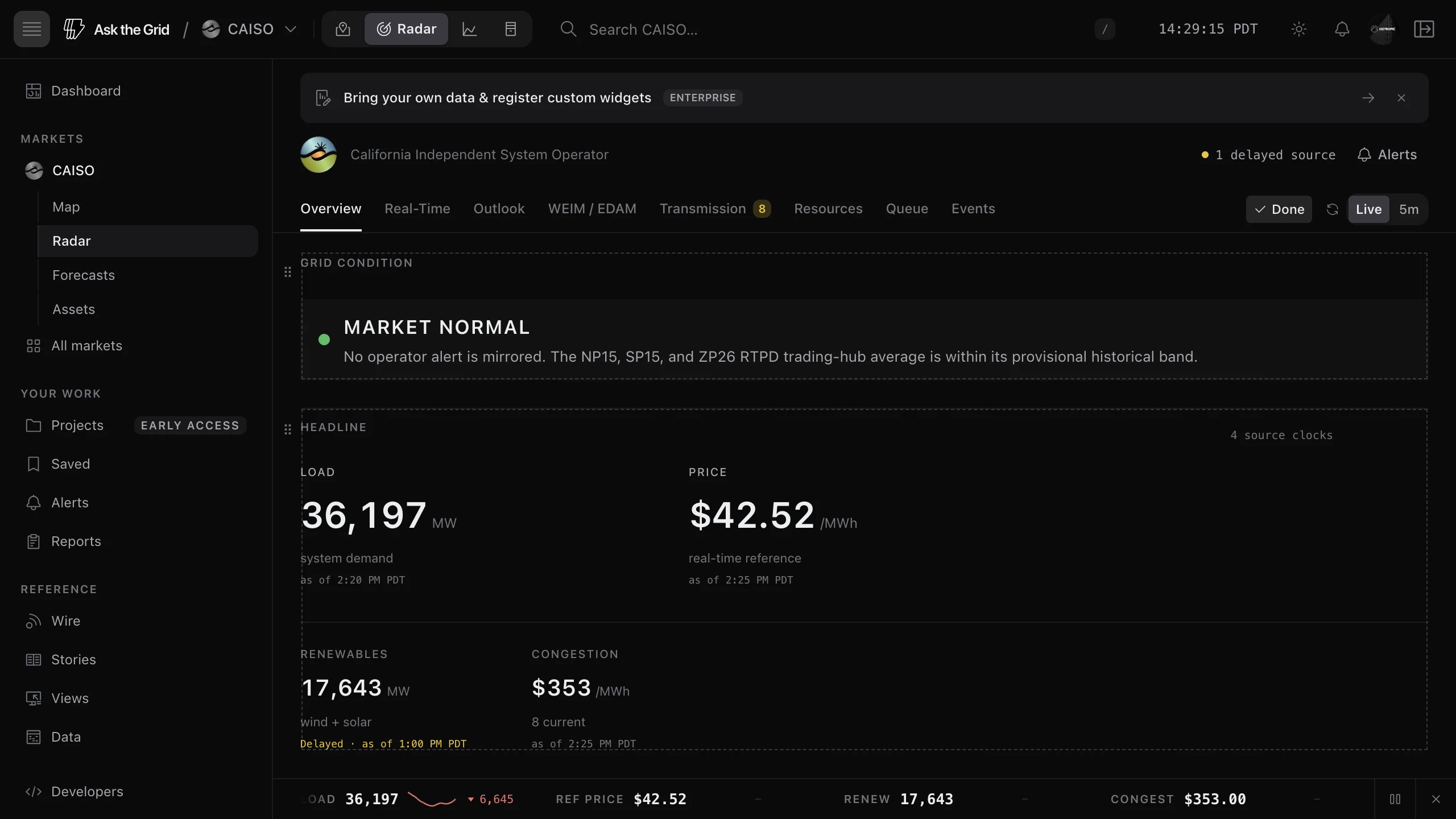
Turn on Edit dashboard, move supported widgets by their drag handles, and choose a Widget size from a widget's options menu. Select Done when the layout is useful; the arrangement is kept in this browser and returns the next time you open that desk.
- 1Open a full Radar desk and select Edit dashboard.
- 2Drag the highest-value widgets into the first screen.
- 3Change a chart's Widget size only when the added space improves the time or comparison read.
- 4Select Done and reload once to confirm the layout persists.
Reset one desk
Once a desk differs from its default, edit mode shows Reset, which restores that desk's maintained default. Resetting the layout does not change the market, source data, alerts, or Saved items.
Move a signal into action
Link directly to a widget
Choose Copy link to widget from a widget's options menu to preserve the market, desk, and focused widget in the address. The recipient can open the same operating surface without reproducing the navigation path. Get data via API in the same menu shows the Radar request behind the desk.
Open a widget in its own window
Select the new-window control beside a widget's expand control, or choose Open in new window from its options menu, to put the widget in a browser window of its own on a second screen. Open several at once. Each keeps updating with the desk's live data and its address bar holds the widget's link. The windows close when you leave the Radar page or close them. If your browser blocks pop-ups for Ask the Grid, allow them to use this.
Export the widget
Select a widget's download control to open it expanded with the export dialog, then preview, retitle, and download a high-resolution PNG for a briefing or operating note. The image carries the widget's readings and source times in the same frame as every Ask the Grid export, with the export time and the market's Radar in its footer.
Create an alert
Choose Create alert for this signal from a supported widget's options menu to carry the market, metric, current value, and an initial threshold into the editor. Price starts from that ISO's elevated-price line; load and headroom presets scale from the current market reading instead of using one cross-market MW value. Review the comparison window, confirmation, recovery, and delivery cap before saving.
Ask the agent about the exact widget
Choose Ask the agent from a widget's options menu to attach it to the agent composer, then add the question and send when ready. The attachment preserves the market, widget identity, and visible operating context; the agent still checks the underlying source for factual claims.
Did this guide get you unstuck?
One click is enough. No message or account required.