October 2026 Update: 3D Maps, Rebuilt Charts and Ask the Grid Data
A wider North American grid, 3D maps, a rebuilt Chart Studio, Ask the Grid Data, the new Projects workspace, and natural gas connected to power decisions.
James LePageOctober 29, 202612 min read

October changed a lot of Ask the Grid. We expanded across Canada, Mexico and the Southeast, added three-dimensional terrain and richer map layers, rebuilt Chart Studio, opened Ask the Grid Data and shipped Projects. We also deepened the work behind a power decision: investigating fuel supply, reading source documents, running network studies, following assets and researching transmission rights.
The work connects. A transmission line belongs to a landscape. A price move belongs beside demand, weather and the forecast you actually had. A gas-fired plant belongs in the context of the pipelines supplying its fuel. This month we put much more of that context within reach, then made it easier to inspect, query and keep working with it.
01
The physical grid, in three dimensions
The map now has terrain. Switch between a flat view, hillshade and 3D, then move into a mountain corridor or a hydro system to see the land beneath the infrastructure. Satellite imagery gives the same investigation another perspective: the plant site, substation, river and surrounding development become part of the view.
Terrain, weather and the physical grid


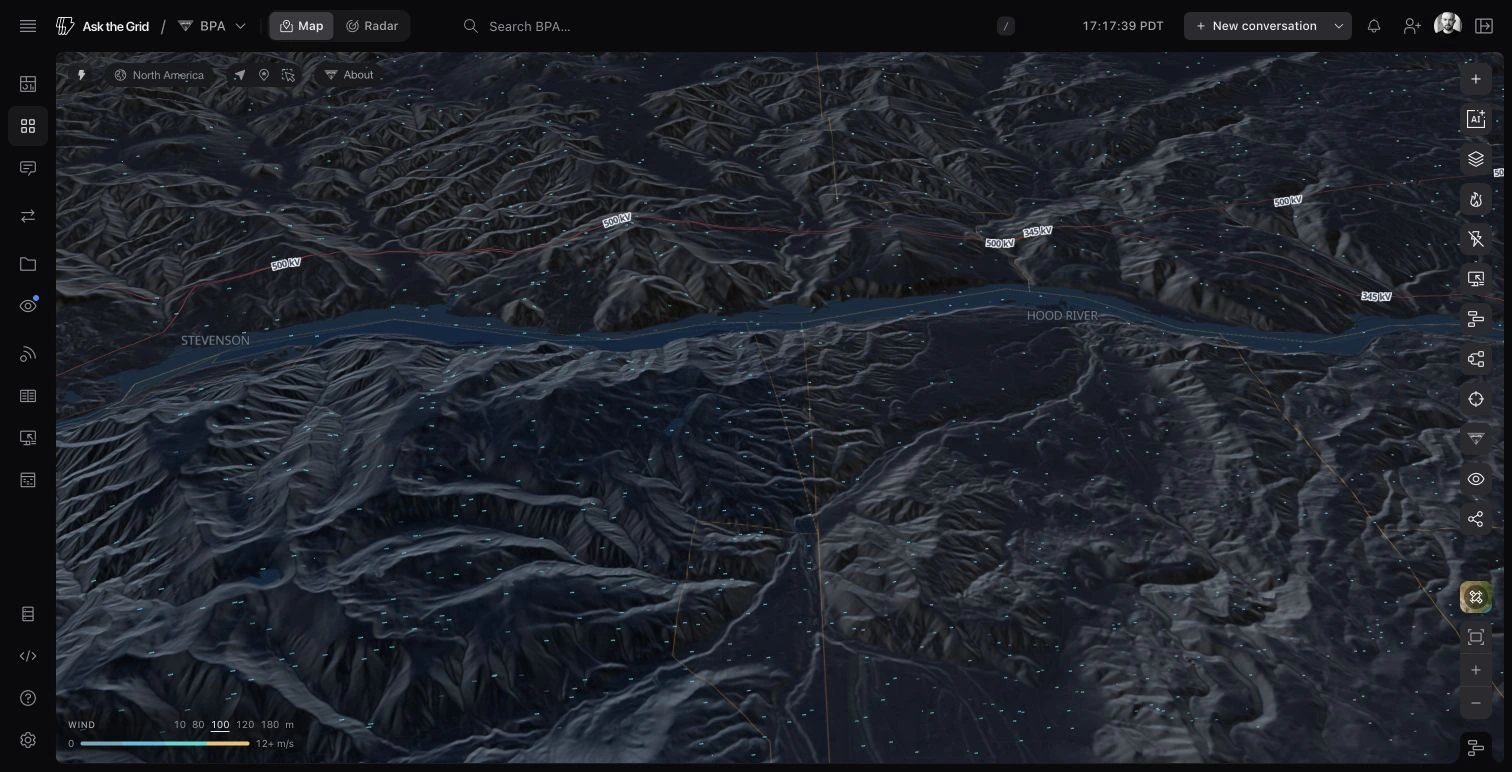
We also did substantial work on how layers look together. Clouds and precipitation can share the map. Wind, temperature, transmission, generation, outages and other layers retain their own meaning while the surrounding map adjusts to keep the scene readable. You can look at the weather moving across a network without losing the network underneath it.
Generation markers reflect capacity, physical facility footprints are easier to see, and infrastructure records connect to the assets around them. Move from a regional view into a particular site and the same map can carry the investigation. The agent’s map controls can help find a place and bring the relevant layers into view.
These changes help when geography is part of the decision: a transmission route through the mountains, a hydro plant on a river, or a site surrounded by several kinds of infrastructure. Open the map and use Map content to build the view around your question.
02
A lot more North America
The geographic expansion was much larger than one new market. Alberta, Ontario and Québec gained operating views alongside mainland Mexico. We added infrastructure maps for British Columbia, Manitoba, Saskatchewan, New Brunswick and Nova Scotia, with Canadian source coverage extending across eight provinces.
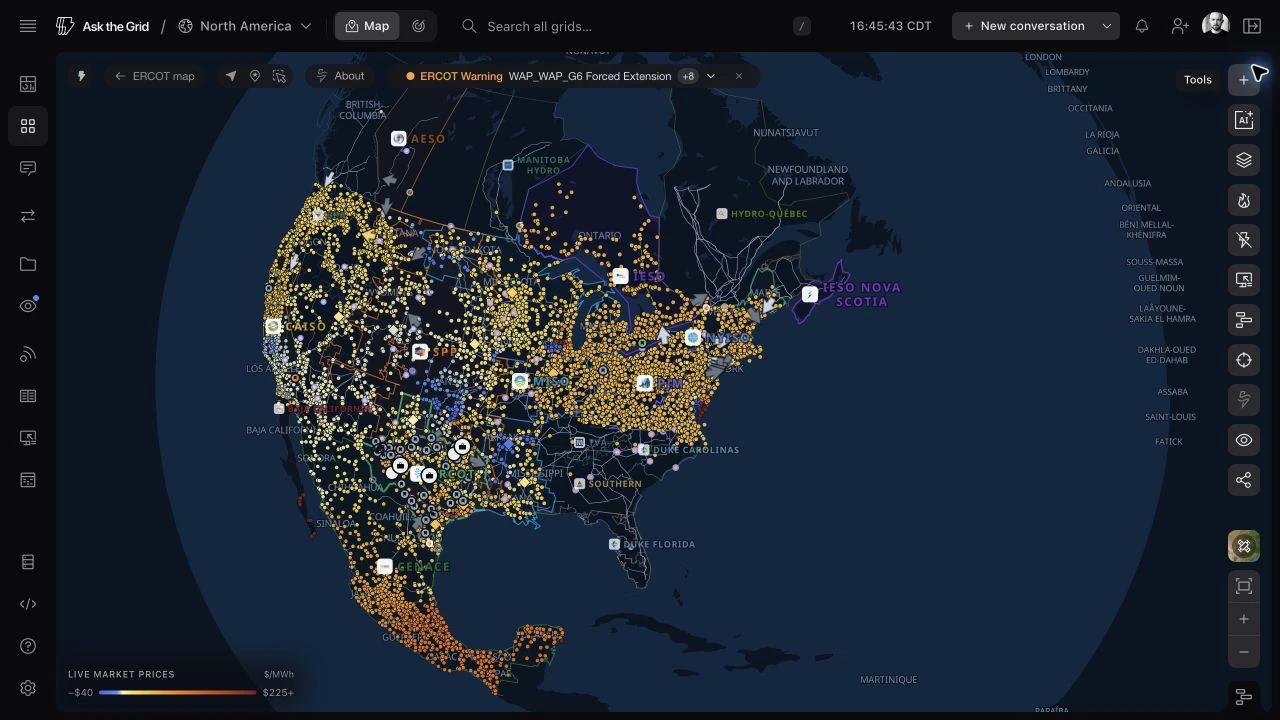
In the Southeast, TVA, Southern, Duke Carolinas, Duke Florida and Florida Power & Light gained their own grid views. Duke Carolinas brings Duke Energy Carolinas and the two Duke Energy Progress operating areas together. These views connect demand and forecasts, generation by fuel, neighbouring exchanges and physical infrastructure, with reservoir and reactor records where those sources are available.
Each place keeps the evidence its operator publishes. Alberta’s provincial price differs from Ontario’s locational market. Québec is read through demand, hydro generation and exchanges. Southern’s regional auction products have their own delivery periods. The additional Canadian infrastructure maps give you geographic context even where there is no corresponding live operating desk.
New grid views across the continent
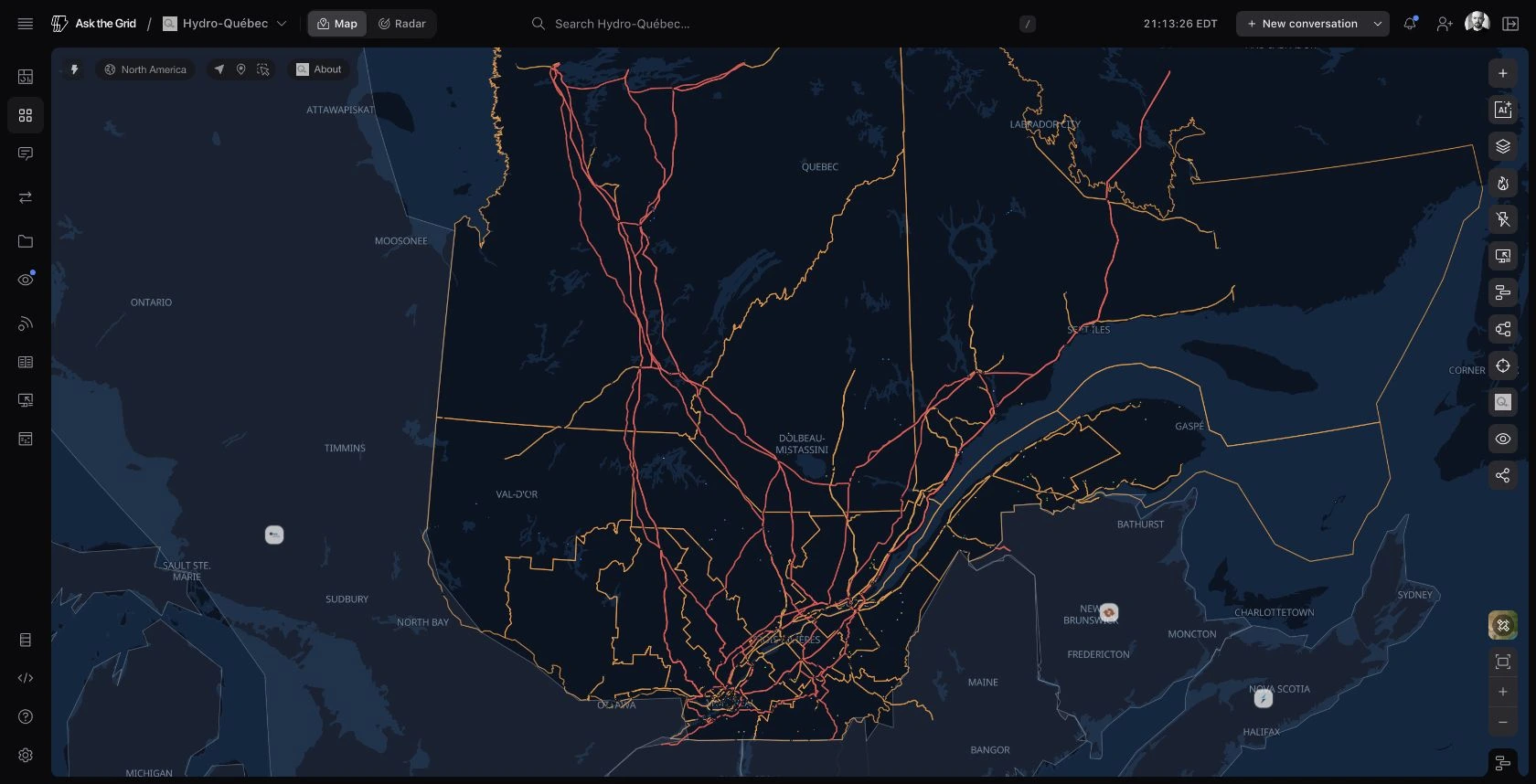
The North America view holds these places together. Choose a grid to work at its own scale, or follow a connection across the border. The market directory explains the available operating views.
03
A national Radar, alongside the map
The wider grid also has a shared operating view. North America Radar brings demand, generation and prices from the reporting markets into one desk, with an overview grouped by interconnection. Move between Map and Radar at the national scale, then open an individual grid when something needs a closer look.
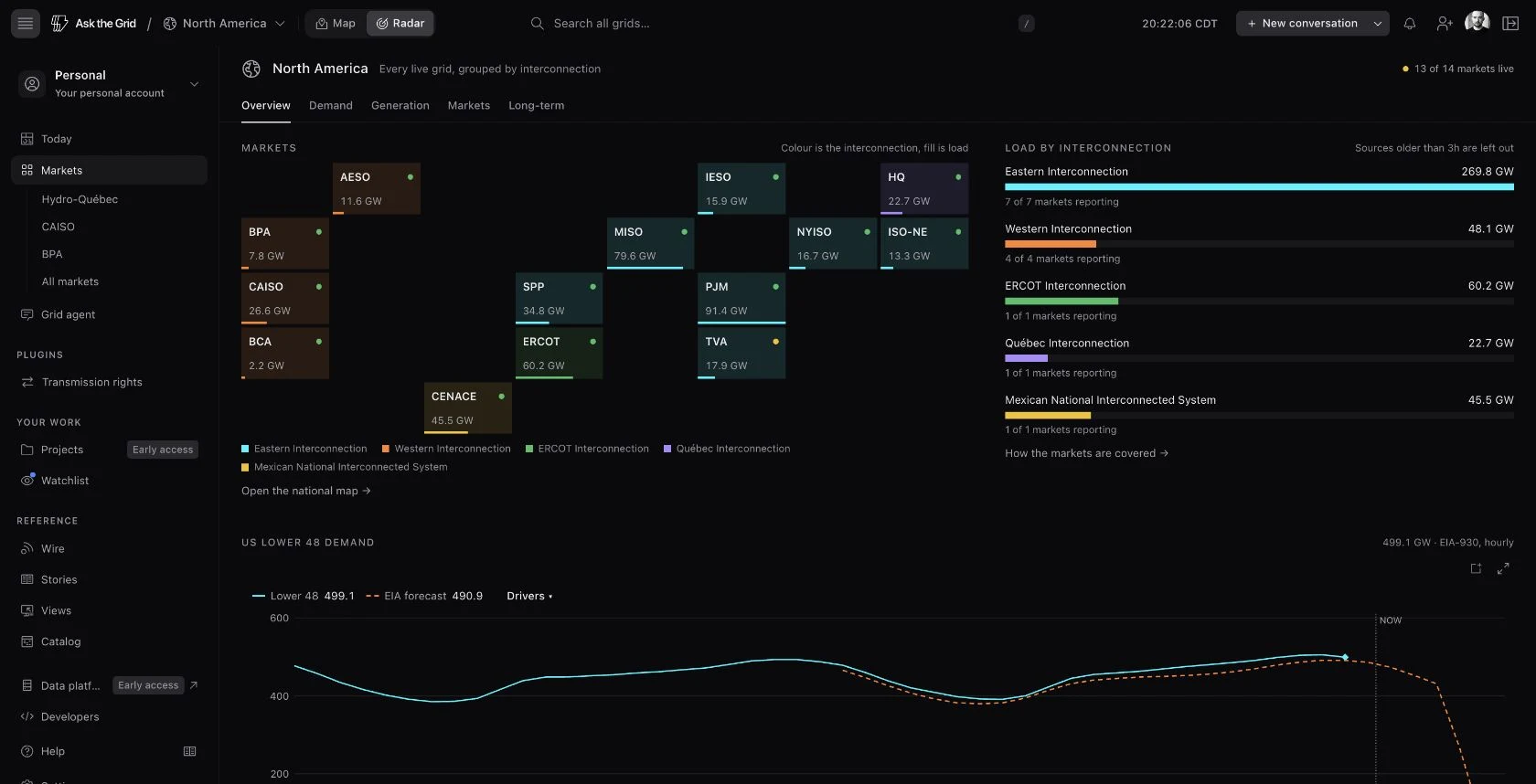
Its Demand, Generation, Markets and Long-term desks let you move from current conditions into regional comparisons and monthly demand and fuel-mix history. Reporting status stays visible beside the readings. Open North America Radar to start with the whole system.
04
Chart Studio: clearer charts, multiple windows
We rebuilt Chart Studio this month. Open a chart from the map, Radar, a forecast page or an agent answer and you get the same place to inspect it. The chart has a clear readout beside it, fewer competing controls and a legend that lets you choose what to show. Pin a time and the inspector stays with that instant while you compare the series.
Just as important, you can pop charts out into their own windows and keep several open at once. Put a price chart beside demand, generation or another location, then keep exploring the map with those charts still in view. Linked cursors help you inspect the same instant across them, so a comparison can stay open as the investigation moves forward.
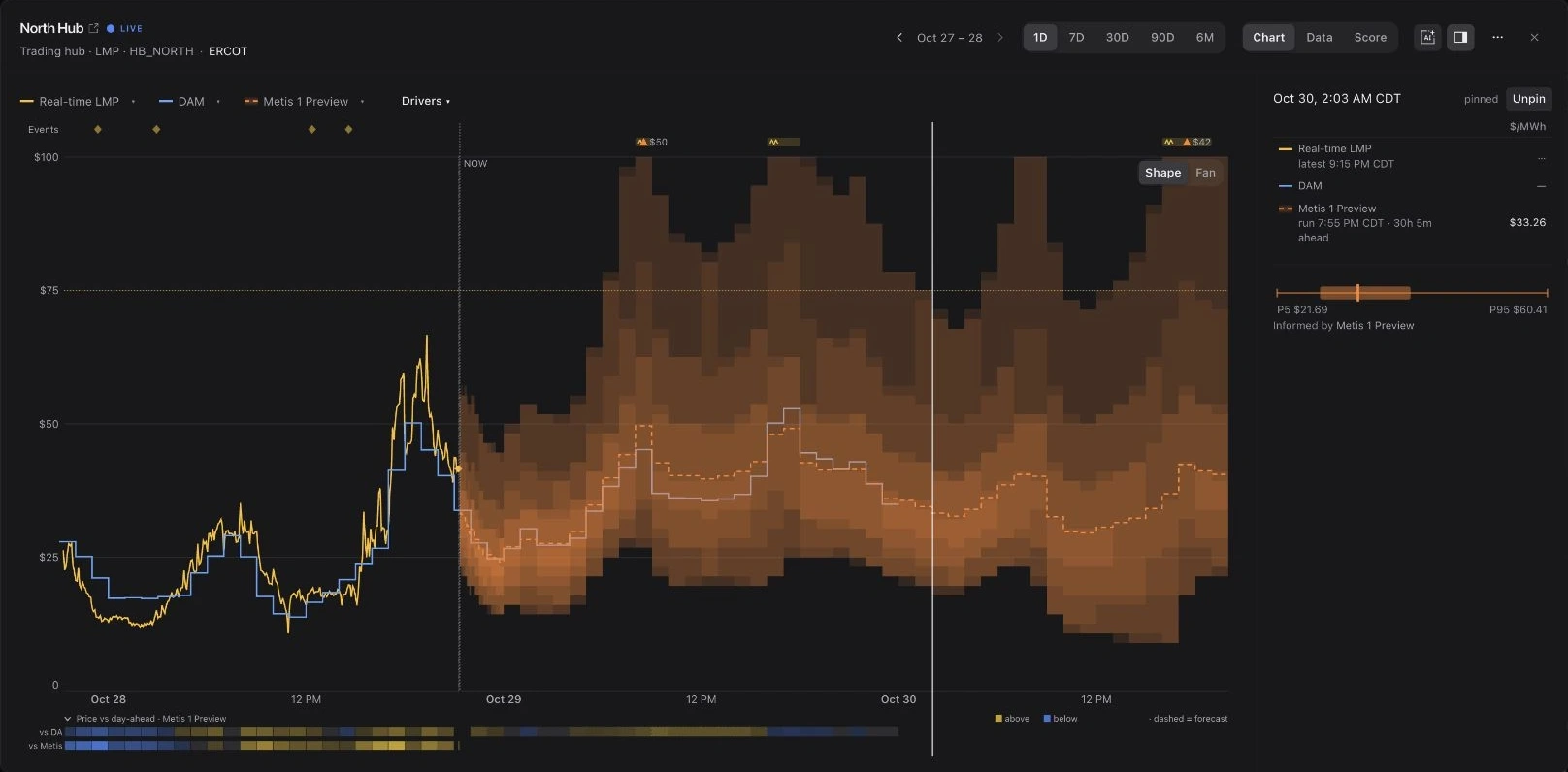
For a price forecast, the inspector makes the distribution easier to read. You can inspect its range, see a set of equally likely outcomes and compare them with the day-ahead price. Settled periods show where the observation landed. The model’s range, an auction price and an observed value remain distinct throughout the view.
The Score view answers the next question: how did those forecasts compare over the selected settled window? It brings absolute error, bias, interval coverage and lead time into the chart. Load, net load, wind, solar and site temperature can be added as drivers when available, so the price question can be inspected beside the conditions around it.
Share a chart, take its data into another calculation, or ask the agent with the chart attached.
05
A clearer test of forecast performance
October also changed how forecast comparisons are presented. The accuracy page brings price, demand, wind, solar and grid conditions together, with error, bias and the forecast’s information deadline available to inspect. A same-hour persistence baseline gives the operator forecasts another point of comparison.
When comparing a model with the day-ahead auction, we use the forecast available before that auction closed, matched to the same settled hours and locations. Comparison summaries show the evidence behind a result, and a verdict waits for seven complete operating days on one model build.
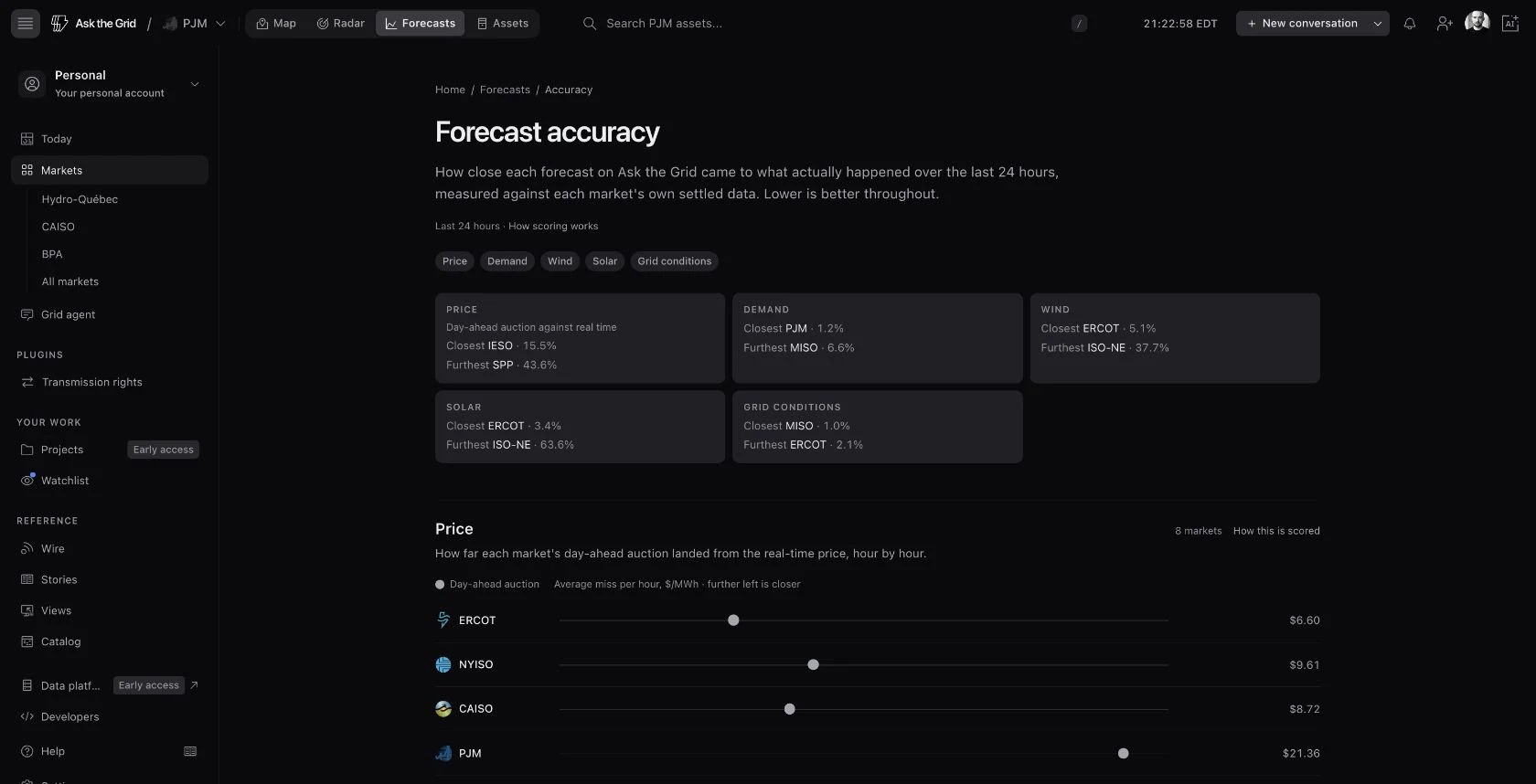
We published an interactive five-market study to make those distinctions concrete. Its October 14–20, 2026 UTC analysis matches 2,737 hourly day-ahead and real-time price pairs across ERCOT, CAISO, NYISO, PJM and SPP, and compares two ERCOT demand-forecast vintages on the same 168 delivery hours. Explore the charts and download the underlying rows, then use the live accuracy page for the current rolling window.
06
Ask the Grid Data is available
We opened Ask the Grid Data. The data behind a map or chart can now be the starting point for your own analysis: browse the catalog, open a table, inspect its schema and sample, and work with it in the SQL workspace. Dataset descriptions explain what each source contains before you commit to a query.
Save a useful query and share it with your team. Import a CSV, bring in your own data and compare it with the grid records your workspace can read. Exports and the API give the same work a path into a spreadsheet, a notebook or an application. Connections and data-health views help keep an ongoing workflow supplied.
We also brought more official operator reports into Radar, the catalog and the agent’s queries. Operating margins, reserve capability and renewable curtailment can be inspected beside original source records and relevant map geography. Publisher scope, units and preliminary or final status stay with each series.
This is a new working surface, beyond the public catalog. You can move from discovering a dataset to doing the analysis in one place. Open Ask the Grid Data or browse the public dataset catalog to see the sources behind the platform.
07
Natural gas belongs in a power decision
A gas-fired plant can be available to the power market while its fuel supply deserves a closer look. We put considerably more work into that investigation this month: broader public pipeline data, historical capacity postings, native locations and records that help connect a plant’s declared fuel suppliers with candidate delivery points.
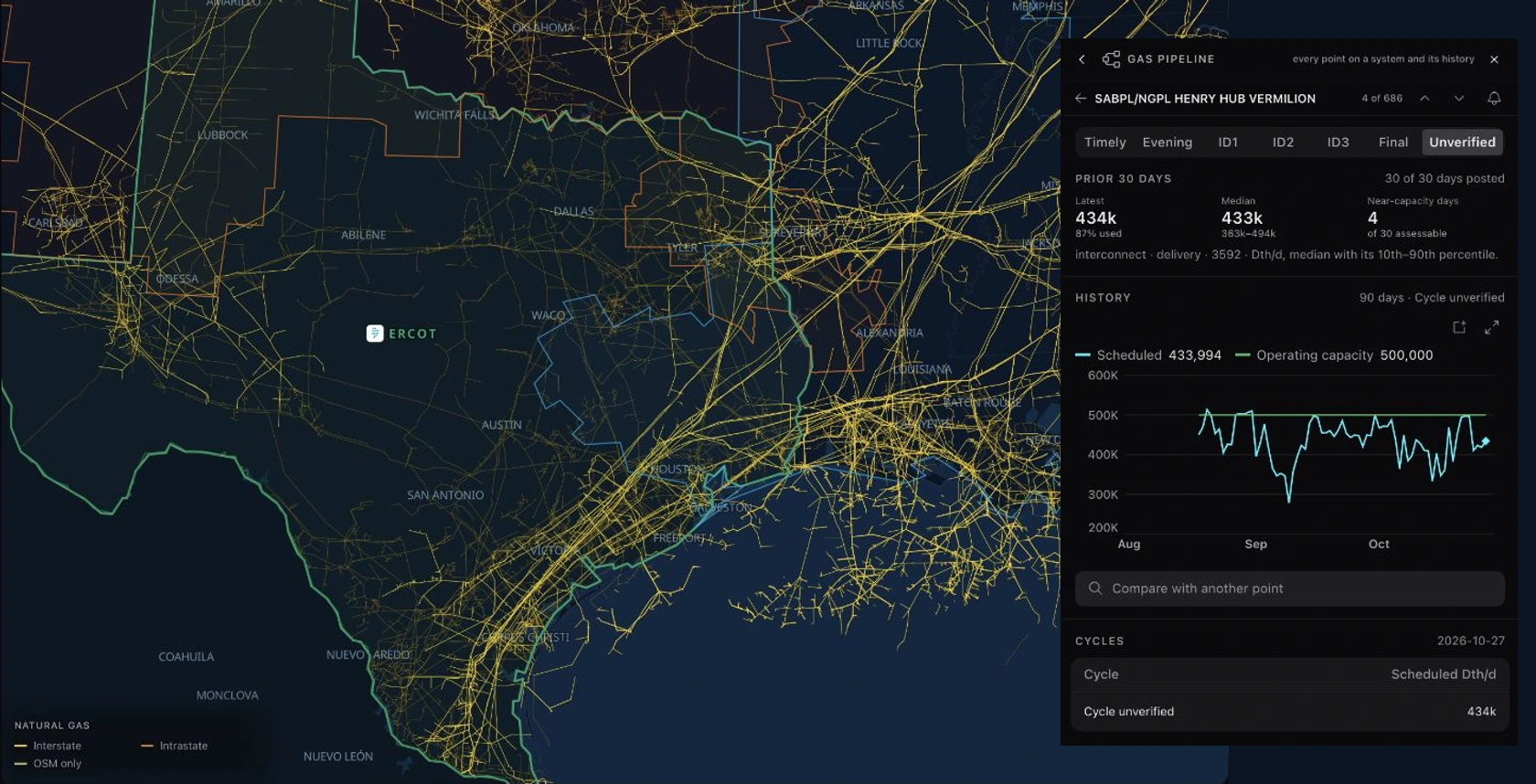
Select a pipeline on the map to move into its system and points. Inspect scheduled quantities against operating capacity, choose the nomination cycle and open the history. The point’s gas day, cycle and Dth/d units stay with the posting; scheduled quantities are nominations rather than metered flow. The gas point keeps its identity as you move between the map, the chart and the agent, so a question about one delivery location stays attached to that location.
Gas-fired plant cards can show candidate fuel-supply matches. Follow a matched point into its postings and recent history, compare it with other points and create an alert on its scheduled share of capacity. A candidate match is a lead for the investigation; the plant’s declared suppliers and the point’s records provide the supporting evidence. California’s utility gas operations also sit beside the electric-grid investigation, with the source’s gas day, cycle and units kept with the reading.
This gives a power question another useful line of investigation: what is happening on the fuel side, where is the evidence, and which point should we keep watching? There’s a lot more on the way for natural gas, all with the same aim: helping people make better power decisions.
08
Projects is here
Projects is here. Keep a site’s documents, assumptions, findings and conversations in one workspace, with the grid around it in view. The work can build over time, whether you’re reviewing a financing case, a connection study or an operating decision.
The agent can read the documents and surface conflicts for review, with evidence traced back to the source. A finding keeps the quoted passages and the decision together: confirm it, dismiss it or request more information.
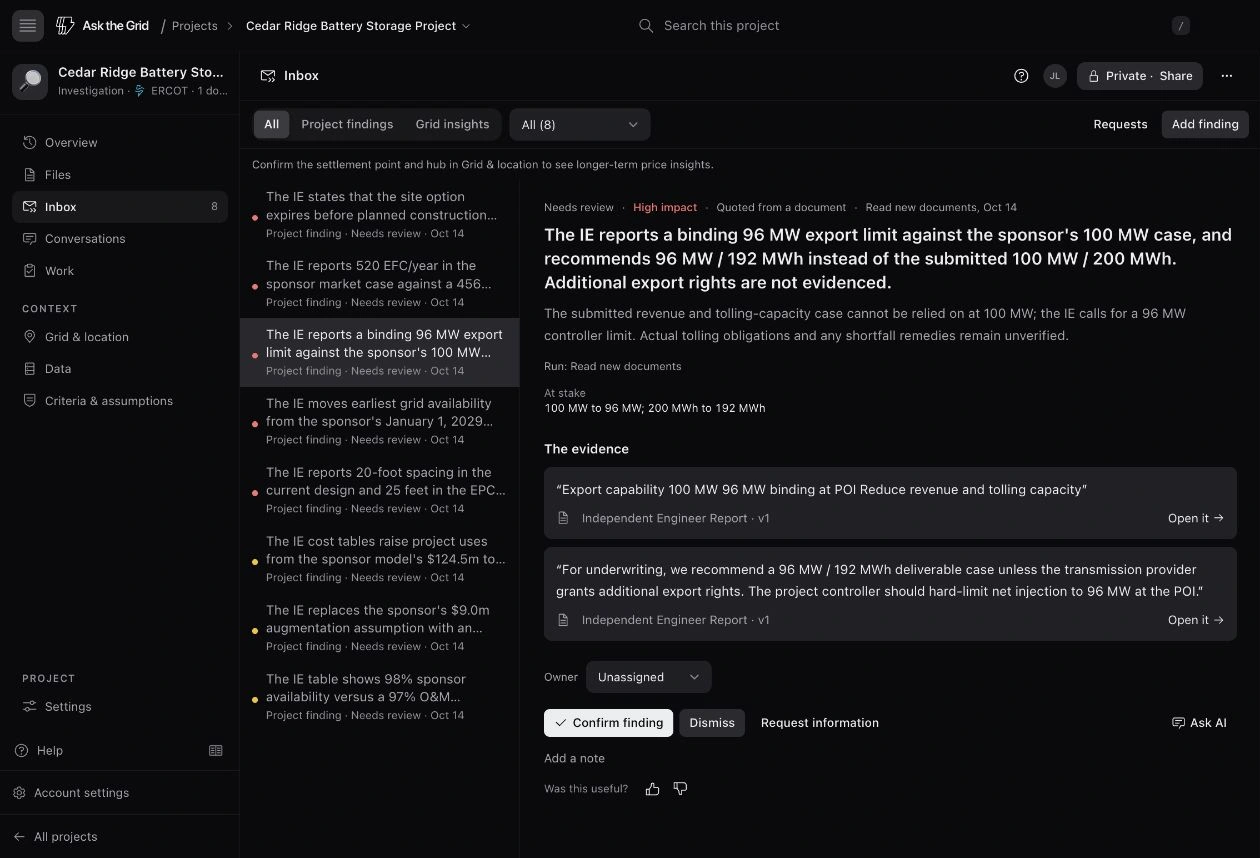
In the fictional Cedar Ridge demo, the agent flags a 100 MW / 200 MWh sponsor case against the engineer’s 96 MW / 192 MWh recommendation and reported 96 MW export limit. The cited passages sit beside the finding so the review can start with the evidence.
Open Projects to keep the investigation together.
09
The agent has more room to work
The full-page agent became a more capable working environment. Maps, source files, charts and outputs can sit beside the conversation. Answers can include annotated maps and interactive visualizations, while the context rail keeps the results and sources reachable as the investigation develops.
The evidence is easier to inspect, too. Numeric citations can open the returned source rows and query, with the cited value highlighted. Export those rows to Excel with source notes attached to numeric cells, so the calculation can continue in your own workbook.
The agent can also search official utility tariffs and read the relevant pages with direct PDF citations and details on the version and when it was checked. That adds the published tariff to an investigation of a site or service territory. Government-filings research is available when enabled in your source settings.
Compatible network models add another step: ask for a change in injection, demand or equipment status and inspect a DC or AC study with its input case and assumptions. Completed results stay with the work. The method and source model define what the result establishes.
Read more about working with network models, or open the grid agent with the place, source or dataset you want to investigate.
10
Watch the things your work depends on
We brought saved items, alerts and recurring briefings together in Watchlist. Follow a market, plant, pricing location, county, queue request or directed path, then return to what changed. Collections let a fleet or a set of research subjects stay together.
A watch can carry findings, numeric alerts and a recurring briefing. Open an item to inspect its current context, change how it notifies you, add a note or revisit its activity. For an interconnection request, open the operator’s application record to inspect its native identity, published milestones and snapshot history. The same watched subjects are available to the agent and connected tools, so a saved list can become the scope of the next question.
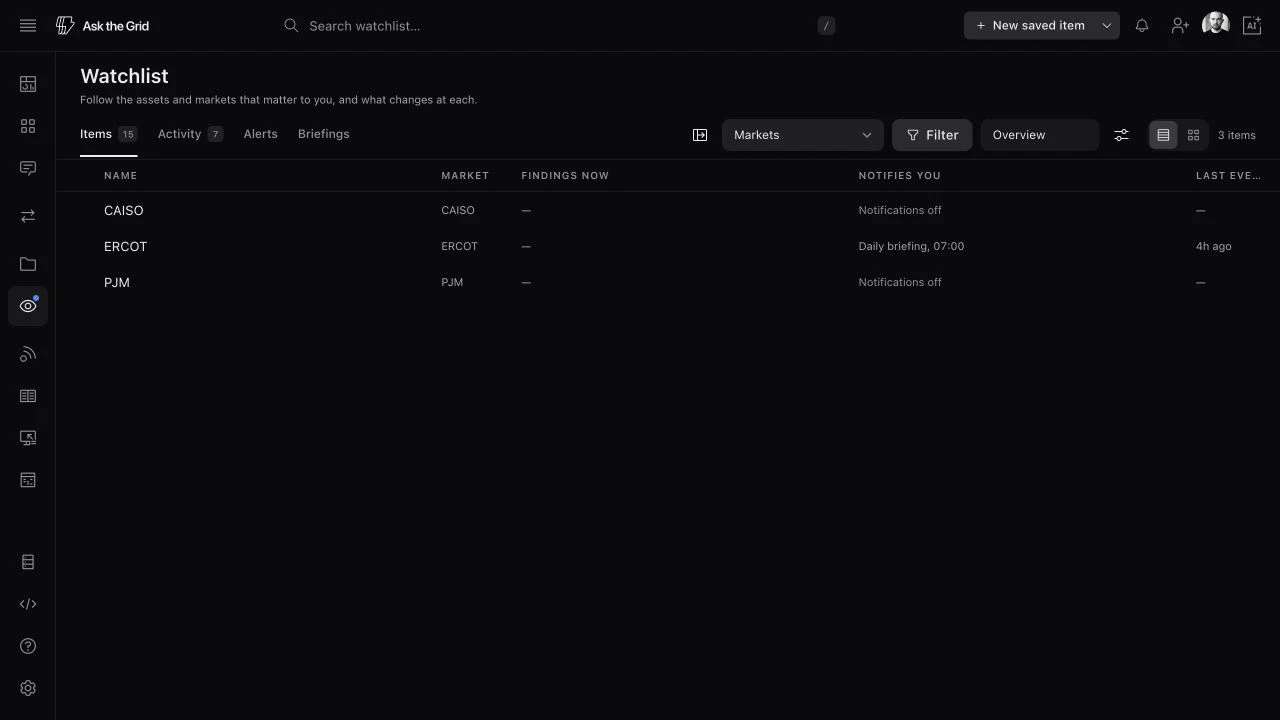
We also rebuilt the recurring briefing workflow. An edition can investigate the reader’s assignment, use prior issues and steering, and bring the relevant charts and evidence into the result. Review an issue before delivery when needed, then keep the archive for the next morning’s comparison.
11
A dedicated desk for transmission rights
Transmission-rights research gained a dedicated desk. Start with public ERCOT auction paths or build a directed pair, inspect the product and delivery period, and compare the auction record with historical congestion rent. Open the path to continue into its history and the constraints associated with it.
Books connect positions, review and the map. See a whole public holdings book as a network of geographic sources and sinks, then inspect the paths behind an exposure. The auction workflow also reaches into bid sets, the ERCOT upload file and results-day reconciliation, from researching a path to reviewing what a book holds.
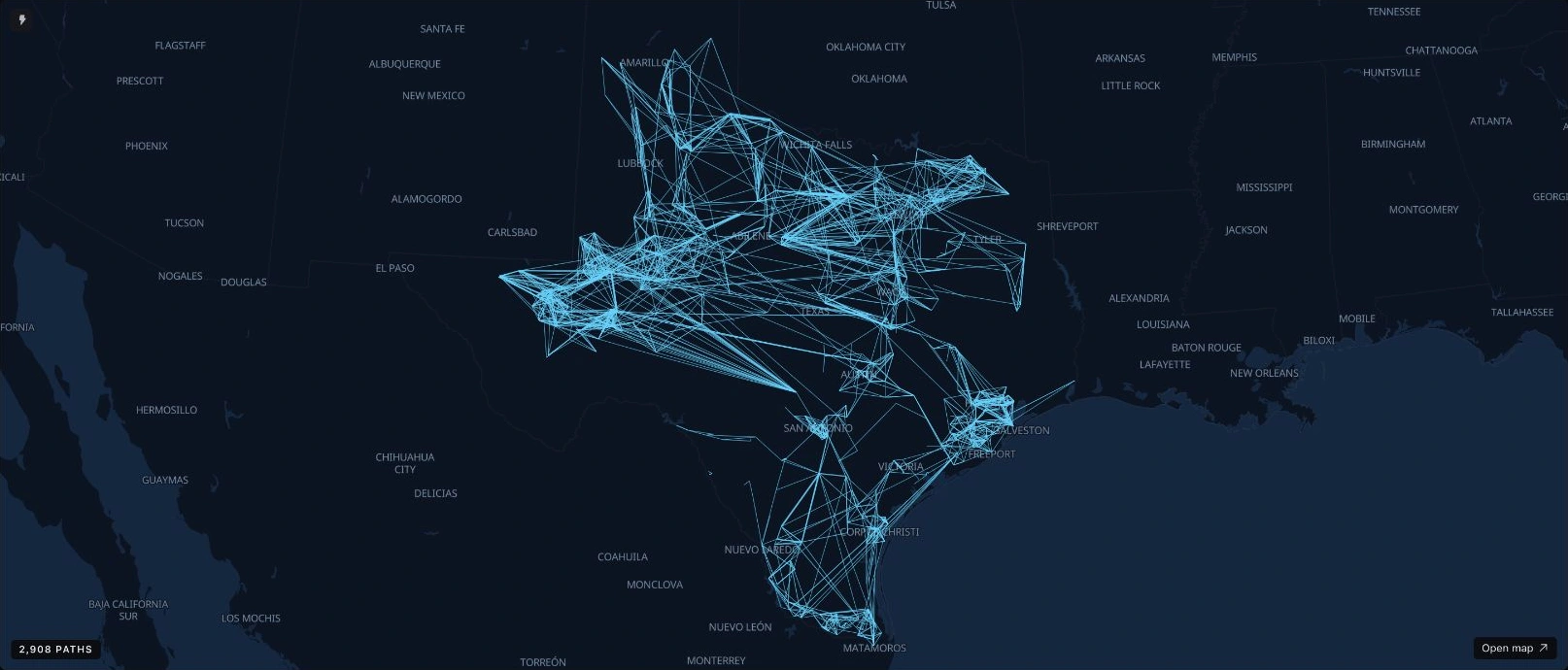
The current auction workflow focuses on ERCOT congestion revenue rights (CRRs). The map shows a public holdings book, with positions grouped into geographic source-to-sink paths. The recording follows North Hub to Houston Hub with its peak-weekday obligation product and displayed historical window. Auction cost and historical rent remain separate parts of the decision.
12
Make the work useful to the team
Shared organization collections, project collaboration, reusable queries and a common developer portal give teams more ways to work from the same context. Slack and Teams channels can carry alert and briefing delivery, while shared answers and map links keep the underlying question accessible.
Team setup is clearer, too. Share a link, invite someone into a team or let verified colleagues request to join an existing organization. The developer console brings usage and request logs into the same table and filter system, while organization audit records make changes easier to review.
Saved prompts can now belong to you or your organization. Fill in a prompt’s variables and use it in the agent; choose the plugins for a conversation and inspect what each can read or do. Teams can keep a repeatable starting point for recurring analysis.
We rebuilt the public site and expanded the public Views. Hub-price pages, renewable shares and emergency histories give readers a direct route into a grid question; findings and Energy Wire stories add context around what changed. The Help Center grew alongside the product, so a new workflow has somewhere to start.
Energy Wire also connects reporting more directly to the grid. Plant and pricing-location references can open the relevant map, profile or reverse news feed, so you can move from a report to the assets and settlement locations around it. Read Energy Wire or open the linked news from a plant or node.
We also opened more ways into the platform from other tools, including Ask the Grid’s ChatGPT directory listing, MCP and the developer platform. The Help Center covers the current workflows. Start with a place, a dataset or a decision, and carry the useful work forward.